Custom Search
Showing posts with label scrapbooking. Show all posts

Monday, 7 September 2009

Digital Scrapbooking How-To

How to Make Your Own Digital Scrapbook Papers
"In a world of digital scrapbooking, here are some tips on customizing images and creating your own scrapbook papers and accessories for all occasions."

I think I want to write a post too about the process of making some of these pages from a random photograph I took. Coming soon. :)

Scrapbook Page Progression

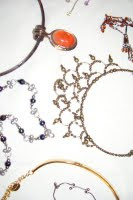
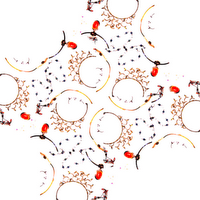
So some day last week (I think, who can keep track of time, he he) I was doing a photo shoot but didn't have anyone over so I just started taking pictures of random objects in my room. I wanted to really lay out props and do this whole elaborate setup, but you know me, I get really lazy. :) I ended up at one point just throwing some necklaces on a table. With only a little effort, the original picture edited and duplicated in Microsoft PowerPoint turned into the latter.


Which, when duplicated and resized and further edited in GIMP, turned into these. Nothing special, it's just the whole I-made-it factor. :)


Details: Edited in Microsoft PowerPoint and GIMP.

Monday, 31 August 2009

ForeverSo

So, yesterday at Church, a 19-year old--who is preparing to go on a two-year mission starting next week--spoke to the congregation as well as two members who joined our Church later in life. The stories and testimonies were all so touching and it reminded me how truly blessed I am to know that Jesus is the Christ and God has restored His Church on the earth.My sister took these photographs of the Denver, Colorado Temple of The Church of Jesus Christ of Latter-day Saints and wanted me to play around with them. No disrespect to my sister, but I don't think a photograph can capture the majesty of this building. If you're ever in the area, you should check it out for yourself. :)
Details: I made the black border overlay in GIMP and then I pieced together the photograph, overlay, and text in Microsoft PowerPoint. The font is a free download but I cannot remember what the name is. Do you really want me to go back and look it up? :) We put "Forever" on there because of our belief that, in the Temple, families can be sealed together for eternity.
The second image I did all sorts of weird stuff to. :) I combined various versions and layers of the original photograph with an Embossed version, something that can be accomplished using the GIMP tool of the same name (which can be found under the "Filters" tab in the category "Distortions").

Sunday, 30 August 2009

Wordle.net

So I think I may have just come across the coolest wordart site ever created for lazy people! :) It's called Wordle.

You can insert your own words or a url to extract text from. The design is automatically computer generated and you can play around with the format to customize it to your likings. I entered this site's url and here are some of the designs. Not bad for three seconds of effort each. He he.


Obviously, this has a lot of potential if you want to do specific themes, like religion, or father's day or whatever. The site asks you to always cite them, but they even give permission for commercial use of the designs. And that's pretty incredible.

One tip: a url must have an associated feed in order to work. So when I tried Lds.org and Mormon.org, it didn't work. But when I tried LDS Newsroom, it worked just fine. So keep that in mind if you're like me and can't fathom actually coming up with a whole list or words. :)

Fun, Free Dingbat Fonts!


Best Free Dingbat (Symbol) Fonts for Digital Scrapbooking & Crafts: Hearts, Animals, & More!
"Great and easy to use in digital scrapbooking and other projects, dingbat fonts are full of premade-shapes and graphics that can be inserted just like text and customized to any size. Here are some nice, free alternatives to clipart."

Tutorial: How to Create Your Own Word Art

Do you want cute and customized text for digital scrapbooking, but you're not quite sure where to start? Here's a how-to in creating your own word art designs."


Details:
(1) The "Smile" is in the free font Scriptina and is filled with a gradient fill pattern in GIMP.
(2) The "David & Sara" is in the free font Beyond Wonderland and is filled with the same edited photograph that I used to make this blog's background.
(3) The "Best Friends" is in the free font Love Letters and another free font that I downloaded from 1001Fonts.com, but I can't seem to recall it's name. If it comes to me, I'll let you know. :) "Friends" is filled with a GIMP preset pattern--I think called water. I did this one a while ago, can you tell? Hehe.

Blessings of Libert

With thoughts taken from the Declaration of Independence and the Constitution of the United States, here are a few patriotic word art images in honor of July 4."
Details: Made in GIMP with the background originating from a photograph of a piece of wood. Font downloaded from 1001Fonts.com. And a shout out to Catherine for exposing me to this kind of stuff. :)

Love One AnotherSo

So I made this, but I realize it looks really tiny on the blog. Although not amazing, it really does look better as the .jpg itself. :)

Playing around with various textures in the editing program GIMP, I inserted one of the classic Bible scriptures from John to make a WordArt. "By this shall all men know that ye are my disciples, if ye have love one to another" (John 13:35).

I used three free downloadable fonts in the image: "Journal" for the main text, "Beyond Wonderland" for the word "LOVE," and a self-edited version of "Scriptina" for the shape of the background hearts

Making Your Own Scrapbook Supplies

Digital Scrapbooking: How to Make Your Own Frames, Borders & Other Embellishments "A how-to in creating your own embellishments for digital scrapbooking and other computer-based crafts. Whether you can't find what you want, or you just want something uniquely yours, knowing how to create your own supplies is a great skill to have."

I've been working on a lot of random scrapbooking stuff lately in GIMP. Good times. :)


Look, I'm Catherine. Howdy, howdy, howdy. :)

Come on, who doesn't like Toy Story? Hehe. So Catherine does word art pieces and I usually just stick to making the backgrounds, but these two scripture verses found in Moroni, which is contained in the Book of Mormon: Another Testament of Jesus Christ, were just asking to be put on backgrounds. :)


Details: I used portions of the font Scriptina to make the design for the white flowers. Then I used the following fonts for the text: Scriptina, Journal, BlackChancery Ultra-Light, and Book Antiqua

Some Nature Edits

Chris Chris sent me some photographs ages ago but I never got around to playing with them until now. Sorry! :)


Details: Edited in GIMP. I used some of the digital scrapbook paper I've recently made for the backgrounds and overlays in these three shots while playing around with various opacity levels and recoloring tools.

More Digital Scrapbooking :)

You can see more of my recent scrapbooking pages, if you're interested, on my Associated Content page.


DIY Digital Scrapbooking Kits: The Free Way to Digitally Scrapbook "I love making my own digital scrapbooking papers and supplies in the free editing program GIMP. Here are some samples of what you can make on your own absolutely free! You can also see some related tutorials on my source page."


I Made a Button!

Okay, so maybe it's not that cool. But I've never made a digital button before. :) And I even put "Think" on it using the free font Jay Cons from 1001Fonts.com.
The creator of Jay Cons originally labeled his font Japanese, and an uproar apparently ensued over if it was really Chinese. Hehe. I love people. :) I'm too sleepy now, but maybe someday I'll explain the new GIMP tools I learned to do this: shrink and grow.

More Landscapes

Original photographs courtesy of ChrisChris. Edited in GIMP. My results were nothing special, but ChrisChris gets ancy if I don't post my playing around. Haha. :)

I hesitate to post this, since it's really weird (even for me). But to prove I played with more than one pic . . . :)

Another Digital Scrapbooking Kit


Details: Created in GIMP.

Blue Paper RevisitedI

I previously made and showed some of these beginning blue pages, but I've added some embelleishments to the kit so I'll go ahead and post the collection. :)


Created in GIMP, the free version of Adobe Photoshop.

Look I'm Catherine Part II

You recall Catherine, the home decor extraordinaire. :) She's in the works for a good character quotation from a United States historical figure. So, as the meddler that I am, I found a couple of options and put them on a background I made. Assembled in PowerPoint, the word arts use the the free font Requiem for both the text and the underline.

Blog Widget by LinkWithin